Put your AI models to work together
Ixel runs on your computer and uses the AI you already have: API keys, the Claude Code or Codex you're signed in to, and models running on your own machine. Your keys stay with you, and there's no Ixel account.
What you get
One install gives you three tools and an app that holds them:
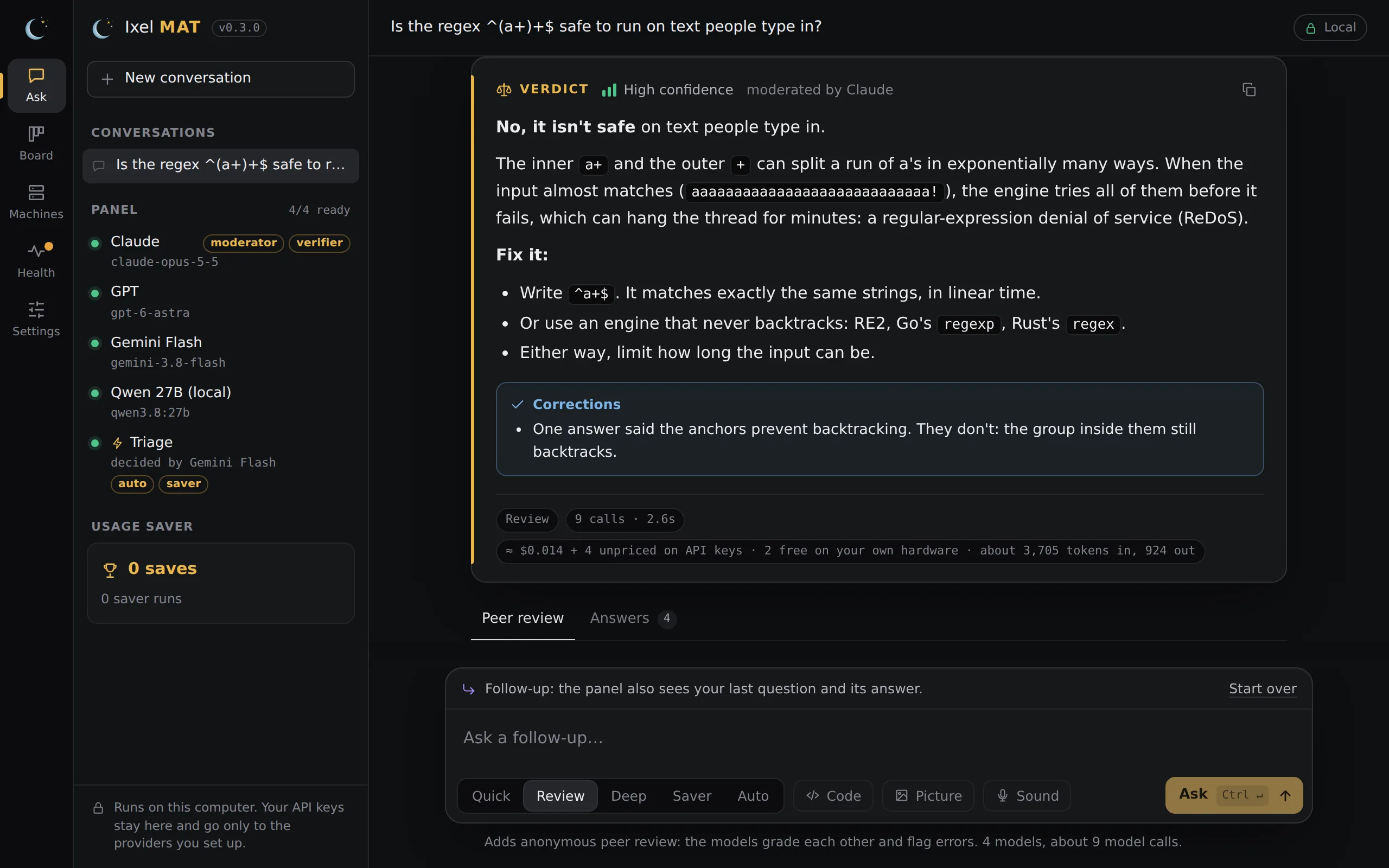
- Ixel MAT, a panel of models. Ask a question and several models answer it, grade each other's answers without knowing whose they are, and one of them writes the verdict. You see who was wrong and why.
- Handoff, a task board your agents share. Claude Code, Codex, Gemini CLI, OpenCode and the rest hand work to each other with notes and reviews, instead of you copying and pasting between them. On the app's Board you pick who builds each task: one model, a chain where a big model plans and cheaper ones build, or Auto crew, where Handoff picks the models and effort for the job. Claude runs show what they cost. A chain you pick yourself can give its small steps to OpenCode's free models or your local models. When a model hits its usage limit, the next best one you have that isn't known to cost more takes over instead of the run stopping. In a chain of three or more models, work done by the small and local ones is checked by a bigger one on its way back up (the recommended setup).
- Machines, your SSH servers in one list, and the OpenClaw or Hermes agent on each, a click away.
- The Ixel app, one window with all of it: Ask, Board, Agent, Machines, Health and Settings. The Agent (beta) works in a folder you pick and asks before it edits or runs anything. Add-ons in Settings bring in open-source tools, such as Diagram Design for diagrams in Ask, each switched on only after you've read what it may do.
What it is, and what it isn't
- Not a model, and not a hosted service. Ixel uses your own API keys, subscriptions and local models, so calls are billed to you or count against your plan. There's no account, no telemetry and no server of ours.
- The panel agreeing doesn't make an answer right. Models can share the same mistake, so check what matters.
- It acts only when you ask. A Board task runs only after you approve it, and an approval is good for one run. The Agent asks before every change and every command (except a command you chose to always allow), and stops at a step limit. Nothing runs on a schedule or while you're away unless you start it.
- It never pushes or merges on its own. You merge a finished task yourself, with the Merge button or
handoff merge. - The sandboxes have limits. On a Mac and on Linux, a command the Agent runs has no network, can write only in its folder and can't read your secret folders, but it can still read your other files. On Windows it's only partly sandboxed: its writes are limited, but it has the network and can read your files. On Linux without bubblewrap, or on Windows when its sandbox can't start, there's no sandbox, and the approval says so. With Computer access on, an approved command can do anything you can. Board workers run tests and builds in a sandbox on Linux and on a Mac (Claude Code and Codex); on a Mac those commands can still read other programs' environment variables, so keep tokens out of your shell's environment while a worker runs. On Windows, workers only edit files. Agents you switch on to run with their own permissions (Kimi Code, Cline, OpenClaw) run commands as you, with the network. The Agent's limits.
- Add-ons are yours to judge. Ixel shows what each card says it may do and checks that the files are the ones you approved. It doesn't review the tool itself.
Quickstart
It takes about five minutes, most of it the download.
-
Install Ixel
Windows
In a normal PowerShell window (not "Run as administrator"):
irm https://ixelai.com/install.ps1 | iexmacOS
In Terminal:
curl -fsSL https://ixelai.com/install.sh | shLinux
In a terminal:
curl -fsSL https://ixelai.com/install.sh | shIf Git or Python is missing, the installer offers to install it for you, and asks first: with winget on Windows, Apple's Command Line Tools and Homebrew or python.org on a Mac, and your distribution's package manager on Linux. The install guide goes through each step.
-
Add your models
Open a new terminal window, so it finds the new commands, and run:
ixel setupIt finds the AI you already have (Claude Code, Codex, Gemini CLI, Ollama, LM Studio) and asks for any API keys you want to add. Three models or more is best: with two, a disagreement is a tie. More about setup.
-
Ask the panel
Open Ixel from the Start Menu, your Applications folder or your app menu (or run
ixel app), type a question, and press Ask. Or stay in the terminal: runixeland type your question there. -
Connect your agents (optional)
To let Claude Code, Codex and your other agents share work, go to a project's folder (a git repository) and run:
handoff setup --writeThen restart those apps. How Handoff works.
Find your way
ixel chat, reviewing your code, and every command.
Which model for each jobPicks from public benchmarks, and the recommended setup of models.
Local modelsOllama, LM Studio, Private, and which open models fit your computer.
HandoffYour agents as a team: tasks, handoffs and reviews.
PrivacyWhat stays on your computer, and what goes to which company.
Get help
- Something not working? Run
ixel doctor(or open Health in the app). It checks each part of Ixel and gives the one line that fixes each problem.handoff doctordoes the same for Handoff. - Open these docs from Ixel:
ixel docsin a terminal, or Docs on the app's Settings page. - Found a bug, or a security problem? Email openixel.ai@proton.me. For a security problem, please don't open a public issue.