Handoff: agents as a team
Say "Codex, take the tests; Claude, do the API" and the work, notes and reviews pass between them through a task board they share. You stop being the one who copies and pastes between AI apps. Approve a task with a chain of models, and your best model plans it while cheaper ones build it.
How it works
Each project (a git repository) gets one board, a small database in the project's .handoff folder. Each of your AI apps gets a handoff plugin (an MCP server) that reads and writes that board under the app's own name. Agents create tasks, hand them to each other with notes on what's done, what's left and how to check it, and ask each other for reviews.
Nothing wakes the other app up. An AI app only acts when you prompt it, and a plugin can't push a message into a chat. So after one agent hands work over, you switch to the other app and say:
check your handoffsThat's the whole routine. A new Claude Code session hears what's waiting for it on its own.
The board itself stores and serves text, and the agents do the work with their own tools and their own approvals. Handoff calls a model only when you ask it to: to pick an Auto crew, or to run a task you approved. It never listens on the network.
Connect your apps
Handoff comes with Ixel's installer. In your project's folder, run:
handoff setup --writeThen restart the apps. Setup only touches apps that are installed, keeps everything else in their settings, and is safe to run again. handoff setup without --write shows what it would add, and handoff setup --remove takes it all out again.
| App | Which project it uses | Hears what's waiting on its own |
|---|---|---|
| Claude Code | The folder you open it in, so one setup covers every project | Yes, when a session starts |
| Codex (CLI, IDE extension or app) | The folder you run it in | No: say "check your handoffs" |
| Gemini CLI | The folder you run it in | No |
| OpenCode | The folder you run it in | No |
| Grok Build | The folder you run grok in | No |
| Claude Desktop | The project you ran setup in (it has no folder of its own); run setup in another project to switch | No |
Claude Code's session-start note says only which tasks are waiting, by number ("2 tasks are assigned to you: T-3, T-7"), never their titles or notes. --no-hook leaves it out.
The ChatGPT app isn't supported: it only connects to plugins on the internet, and Handoff never listens on the network. Codex signs in with the same ChatGPT subscription and works.
handoff doctor checks the project, the board, and which apps have Handoff set up.
Walkthrough
You're adding an orders endpoint, and you want Codex on the tests while Claude builds the endpoint.
-
In Claude Code or Claude Desktop
Split this feature. Hand the tests to Codex, and you do the endpoint.
Claude makes two tasks: Add /api/orders for itself, and Tests for /api/orders for Codex, with notes and checks to meet ("tests/test_orders.py covers GET and POST"). It claims the files it will change, starts on the endpoint, and tells you to ask Codex to check its handoffs.
-
In Codex
Check your handoffs.
Codex sees the task with Claude's notes, takes it, writes the tests, and hands it back with what it did:
Done: Tests written in tests/test_orders.py
Left: 2 fail until the endpoint lands
Verify: pytest tests/test_orders.py
Files: tests/test_orders.py
-
Back in Claude
Anything from Codex?
Claude reads the handoff, finishes the endpoint and runs the tests. It asks Codex to review the endpoint (or asks your Ixel MAT panel). Codex marks each check met, not met or not checked, so Claude sees exactly what still needs work. When the review approves, Claude marks both tasks done.
-
Any time, in a terminal or the app
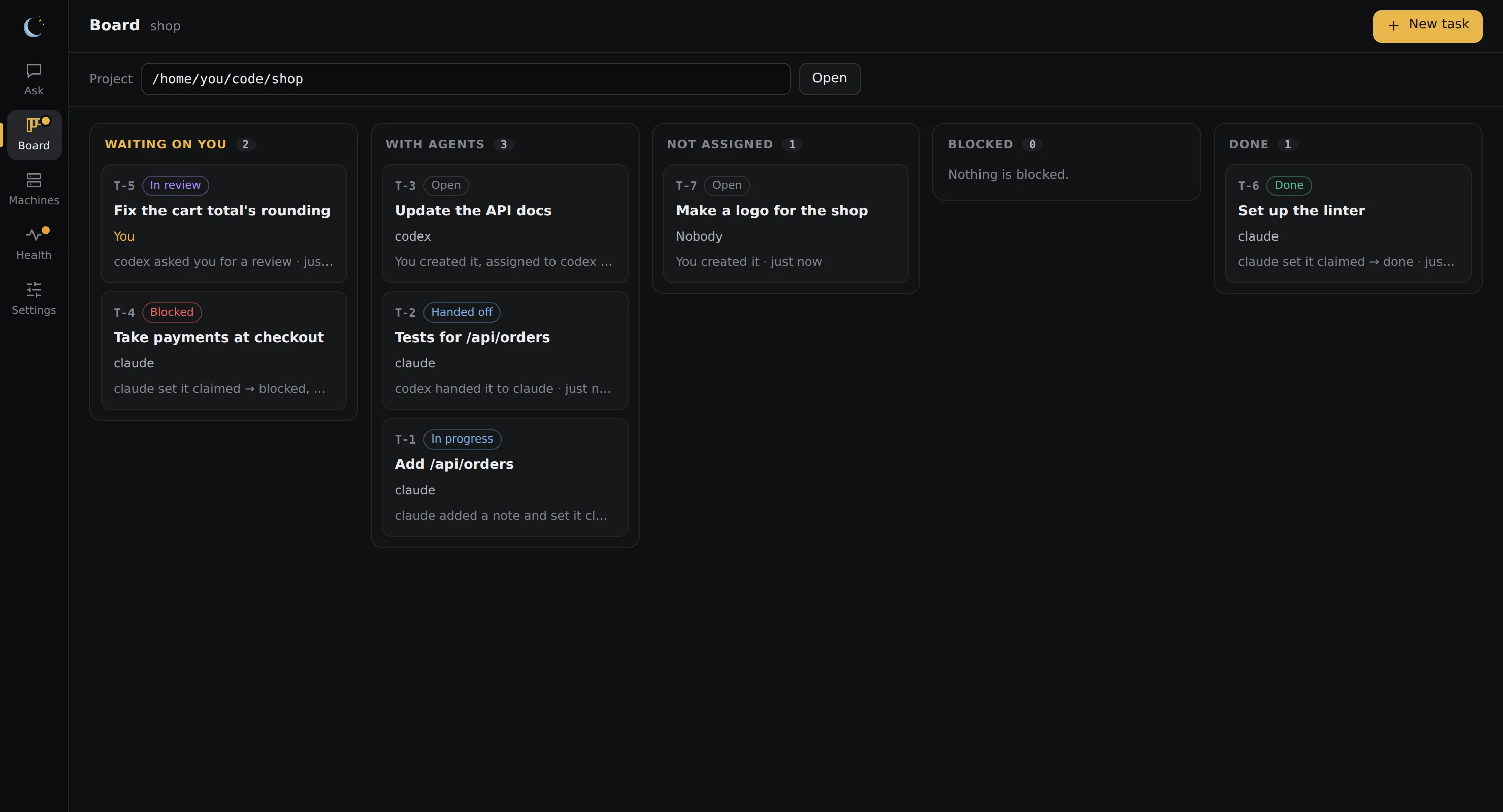
handoff boardshows who's doing what:handoff board Handoff board 6 active · 2 open · 1 in_progress · 1 handed_off · 1 in_review · 1 blocked · 1 done ~/code/shop Task Status Assignee Title Updated Last ───────────────────────────────────────────────────────────────────────────────────────────── T-5 in_review you Fix the cart total's rounding 17m ago codex asked you for a review T-2 handed_off claude Tests for /api/orders 17m ago codex handed it to claude T-4 blocked claude Take payments at checkout 17m ago claude set it claimed → blocked, waiting on you T-1 in_progress claude Add /api/orders 17m ago claude added a note and set it claimed → in_progress T-7 open — Make a logo for the shop 17m ago you created it T-3 open codex Update the API docs 17m ago you created it, assigned to codex
handoff T-2prints one task with its whole history, and what you can do with it next:handoff T-2 T-2 handed_off assigned to claude Tests for /api/orders created by claude 17m ago · updated 17m ago claims tests/test_orders.py Cover both routes. Acceptance ☐ 1. tests/test_orders.py covers GET and POST ☐ 2. pytest runs without network History 2026-10-04 10:17 UTC claude created it, assigned to codex 2026-10-04 10:17 UTC codex claimed it 2026-10-04 10:17 UTC codex claimed paths tests/test_orders.py 2026-10-04 10:17 UTC codex handed it to claude Done: Tests written in tests/test_orders.py Left: 2 fail until the endpoint lands Verify: pytest tests/test_orders.py Files: tests/test_orders.py Next: claude picks it up in its app when you say "check your handoffs". Or run it now: handoff approve T-2 claude
The Board in the Ixel app shows the same board in columns, and lets you act on each task with a click.
Hand out a whole list at once
Start each part with who does it, and Handoff splits the request by plain rules (no model guesses), shows you the plan, and on a yes runs every part at the same time:
handoff dispatch "codex review my changes, grok make pictures of my app, claude finish the next step, and gemini make me a list of projects to check out"
  1. Codex reviews · your uncommitted changes
     Review your uncommitted changes
  2. Grok makes pictures · 2 pictures, based on README.md
     Make pictures of my app
  3. Claude changes files
     Finish the next step
  4. Gemini answers
     Make me a list of projects to check out
  Run these 4 tasks? [Y/n]
| Kind | Who | Where the result is |
|---|---|---|
| Change files ("finish", "fix", "build", "the next step") | claude, codex | A branch of its own, handoff/T-N, for you to review and merge |
| Review ("review", "audit") | Any model you added in ixel setup | The task, and .handoff/outputs/T-N/answer.md |
| Answer (anything else) | Any model you added in ixel setup | The task, and .handoff/outputs/T-N/answer.md |
| Pictures ("make pictures", "draw a logo") | grok (xAI), gpt (OpenAI), with your key | .handoff/outputs/T-N/ |
A part that can't run here says why (not set up, no key, nothing to review) and the rest still run. handoff agents shows who can do what on this computer. In the Ixel app, type /handoff in Ask to do the same thing.
Let an agent work while you're away
The worker (a preview) runs an agent on one task you approve, in a copy of your project on a branch of its own. It never pushes, and your own checkout isn't touched:
handoff approve T-7 codex       # you approve one task, for one run
handoff worker --agent codex # runs it, then waits for your next approval- Linux: the agent runs inside a sandbox (bubblewrap) that shows it only that copy of your files and none of your home folder, and the commands it runs have no network. It can run your tests and builds. It needs bubblewrap, and socat for Claude Code; Handoff's installer says how to get them, and
handoff doctorsays what's missing. - Mac: Claude Code and Codex run in the Mac's own sandbox, with nothing to install, and can run your tests and builds. Their commands have no network, can't read
~/.ssh, your logins or your main checkout, can write only in the task's copy, and can't reach your keychain, clipboard, other apps or other processes. One gap macOS can't close: a command can read other programs' environment variables, so keep tokens out of your shell's environment while a worker runs.handoff doctorsays so too. - Windows, for now: edit-only. Claude Code, OpenCode and local models can read and change files, but can't run commands, tests or builds, and the handback says so. Codex doesn't run there.
When it's done, the worker commits its changes on handoff/T-7 and hands the task back with what was done, what's left, and how to check it. You review the branch and run the tests, then merge it with handoff merge T-7 (or Merge on the Board): one merge commit on the branch you have checked out, never pushed. The task is marked done and its worktree removed; the branch stays. If the merge could touch files git doesn't track, Handoff refuses the merge and changes nothing. An approval is good for one run, only on the computer where you made it, and only while the task is as you approved it.
Pick the model, or a chain of models
An edit runs on the agent's own default model unless you name one when you approve it:
handoff approve T-7 claude --model claude-haiku-5-5
handoff approve T-7 claude --chain claude-fable-5-1:high,claude-opus-5-5:medium,claude-haiku-5-5
handoff approve T-7 codex --model gpt-5.5 --effort xhigh
A chain lists models biggest first. The first reads the task (it can read files, not change them) and plans up to 6 steps, giving each step to the smallest model that can do it well: design and tricky logic to the bigger ones; tests, docs and small edits to the smaller ones. Each step is committed on its own, so git log shows which model made what. The planner runs in Claude Code; the steps can run on any agent you have, written as agent:model:
handoff approve T-7 claude --chain claude-opus-5-5,claude-sonnet-5-5,ollama:qwen3:4b-instruct
handoff approve T-7 claude --chain claude-opus-5-5,claude-sonnet-5-5,opencode:opencode/step-5-preview-free
The planner is told which models are small or on your computer, and gives them only short, exact directions: one change in one named file, spelled out, not design or a lot of new code. The recommended setup says which models fit each place in a chain.
Or let Handoff pick the crew
Auto crew is optional. With it off, you pick the models yourself, as above. With it on, you describe the task and Handoff picks the crew: which models, in which roles, and how hard each one thinks. You see the crew before you say yes, and the approval seals exactly that crew.
handoff crew "Fix the login page"              # preview a crew for some words; nothing is approved or run
handoff crew T-7 --effort-all max              # preview one of your tasks, every model at max
handoff approve T-7 --auto                     # approve T-7 with the crew Handoff picks, shown first
handoff approve T-7 --auto --effort-all low # the same, every model at low (or the nearest level it takes)- What it reads. A small model reads the task's title and text (nothing else, up to 4,000 characters) and says what kind of job it is (coding, writing, review, report or pictures) and how big (light, standard or heavy). That's
qwen3:4b-instructwhen your Ollama has it, so nothing leaves your computer; otherwise Claude Haiku 5.5 through your Claude Code, with no tools. If neither answers, the task's words decide by keyword.handoff crewsays which one it used. - Who gets the work. Auto crew picks a chain of up to four models, biggest first, planned on Claude. Fable 5.1 (or GPT-6 Astra) only plans, and only a heavy job gets one. The biggest slices go to Grok 4.7 when it's switched on here, then GPT-6.1 Sol and Opus 5.5, then Sonnet 5.5, then Haiku 5.5 or GPT-6 Luna for the small steps. A light job is Sonnet (or Haiku) and one small model. Local models aren't put in a crew yet.
- Who's left out. Auto crew skips an agent you haven't switched on, and one that hit a usage limit in the last five hours; the next model takes its place.
- How hard each thinks. It depends on the job's size: a light job has medium for the planner and low for the builders; a standard job has high for the planner and builders and medium for the small steps; a heavy job has xhigh for the planner and high for the rest.
--effort-allsets one level for every model instead.
Auto crew is for edits, and can't go with --model or --chain; for answers and reviews you name the agent yourself. In the Ixel app it's the Auto switch on the Board.
Work is checked on its way back up
- If a smaller model fails its step, the biggest step model (the second in the chain) does that step instead.
- When the steps are done, if any was done by a smaller model, the biggest step model checks the work against the task and the plan, with the diff in front of it, and fixes what's wrong in place.
- If it finds something too big for it (a wrong design, a large part missing), it says so, and the planner fixes it, this time with tools to change files.
Each check and fix is its own commit, and the handback says what each one did and cost. If the biggest step model itself fails, the chain stops there and keeps what the steps before it committed.
Effort is how hard each model thinks, in its own tool's words: Claude Code takes low, medium, high, xhigh or max; Codex takes minimal up to xhigh, and the newest GPT models also max and ultra. The biggest model at max effort is the most expensive part of a chain, so save it for the planning that needs it. The model, the chain and each effort are sealed into your approval, so a board can't move a run to a bigger, more expensive model. An answer or a review takes --effort too (handoff approve T-7 gemini --kind answer --effort high): with several agents, it's the first one's level, and if Ixel can't take it, the run goes on at the model's own setting and the handback says why.
What it used. Each run on Claude Code, Grok Build, OpenCode, Hermes or a local model lists each model's tokens and an estimated cost at API prices (on a subscription, that's what it would have cost; it counts toward your plan's limits instead). handoff show T-7 lists it under each run, and the Board shows each task's cost and what the whole board has spent. Answer and review runs list what Ixel reports, or say "no usage reported". Codex, Kimi Code, Cline and OpenClaw runs report nothing yet, and a run that was stopped has no report, so what they used isn't counted.
When a model hits its usage limit
A run doesn't stop because a model ran out of usage. When you approve a change, an answer or a review, Handoff works out who takes over if a model hits its plan's limit, its quota or its credits. It lists the next best models for that kind of work that you have an agent for and that, as far as Handoff knows, cost no more at API prices (Opus goes to Sonnet, never to Fable; a model with no listed price isn't held back), ending with a free or local one. It shows you that list before you say yes, and seals it into the approval, so a board can't add a model to it.
If a model hits its limit mid-run, it sits out the rest of that run and the next model on the list carries on in the same worktree. The handback says so: "claude-opus-5-5 hit its usage limit, so claude-sonnet-5-5 took over." In a chain, a model that runs out hands its part to the next model on the chain's one list, which starts with the next best planners and then the next best coders. So a small step can go to a bigger model, but in a chain written biggest first, never to one Handoff knows costs more than the planner. Any other failure (no login, a crash, a timeout) still stops the run, so it isn't hidden. An agent that runs with its own permissions never takes over until you've switched it on.
handoff approve T-7 claude --model claude-opus-5-5   # shows who takes over, then asks
handoff approve T-7 claude --no-fallback-to codex    # anyone but codex takes over
handoff approve T-7 claude --no-fallback             # stops at the limit instead
handoff rankings --job coding                        # who's best at what, best first
handoff rankings lists which models are best at coding, planning, reviewing, writing, and pictures and video, with the public leaderboards they come from. handoff rankings update gets the newest copy from Handoff's own repository (a public file: nothing about you is sent). You can keep your own in rankings.json, next to agents.toml.
Every agent and model you have
The worker isn't only Claude Code and Codex. Handoff finds these on your computer, and handoff agents lists them:
| Agent | What it can do | Costs |
|---|---|---|
OpenCode (opencode) | Edits files in its worktree with its file tools; no commands, no web | Nothing on its free models (opencode/…-free) |
Grok Build (grok, signed in with SuperGrok) | Edits files in its worktree with its file tools, inside Grok's own sandbox; no commands, no MCP tools, no web. It can still write to /tmp and your ~/.grok folder | Your SuperGrok plan's |
| Ollama, LM Studio, or any OpenAI-style server | Reads and writes files in its worktree through four tools Handoff runs itself; no commands | Nothing: it runs on your computer |
| Hermes Agent | Its file tools only, but they can read outside the worktree | Its model's |
| Kimi Code, Cline, OpenClaw | Whatever their own permissions allow: commands as you, with the network | Their model's |
handoff approve T-8 opencode --model opencode/step-5-preview-free
handoff approve T-9 ollama --model qwen3:4b-instruct      # a small, clear task, done for free
handoff agents enable kimi                                # once: kimi runs with its own permissions
Any of these can also be a step in a chain. Grok Build, Hermes, Kimi Code, Cline, OpenClaw and agents you add run only after you switch them on (handoff agents enable NAME, or the button on the Board); until then, an approval for one of them waits. You decide which of them you trust. Each works in its own worktree and branch, and none of them pushes. Your own agents and model servers go in agents.toml, next to Handoff's approval key; only you write that file, so a project can't add an agent.
Grok Build also loads your own Grok plugins and hooks, which Handoff can't turn off. So before every run, Handoff asks Grok what it would load. If a plugin with hooks or a hook is switched on, Handoff refuses the run and changes nothing; the reason names it (grok plugin disable NAME turns a plugin off). Its sandbox was checked by hand on a Mac, not yet on Linux or Windows.
A small local model is best at small, clear tasks: a rename, a test, a doc change. Pick an instruct model (one made not to think) for those; qwen3:4b-instruct made a one-line change in 9 seconds that qwen3:4b took 5 minutes over. In a chain of three or more models, its work is checked by a bigger model on the way back up.
Your controls
At the command line you're human on the board, shown as "you", and you can do what agents can't. me means you wherever you name someone.
| Command | What it does |
|---|---|
handoff, handoff board --watch | This project's board; --watch keeps it refreshing |
handoff T-12 | One task with its whole history |
handoff add "title" --to codex | Add a task (with no title, it asks what needs doing and who should do it) |
handoff assign T-12 claude | Give a task to someone else (me, or nobody) |
handoff claim T-12 [PATH …] | Take a task yourself; PATHs also claim the files or folders you'll change, and you're warned if another active task claims any of them |
handoff note T-12 "text" | Add a note to any task |
handoff review T-12 | Review a task waiting for you: approve, or send it back with changes |
handoff approve T-12 opencode | Let one agent work on a task, once, on its own branch (add --model, --chain or --effort) |
handoff crew "task" | T-12, handoff approve T-12 --auto | Preview the crew Auto crew would pick, or approve an edit with it (add --effort-all max or low) |
handoff merge T-12 | Merge a finished task's branch into the branch you have checked out, as one merge commit. Only you can, and nothing is pushed |
handoff rankings | Which models are best at what, from public benchmarks, in the order Handoff uses to pick who takes over when a model hits its usage limit |
handoff agents, handoff agents enable NAME | Who can do what on this computer; switch on an agent that runs with its own permissions |
handoff done T-12, reopen, block T-12 "why" | Close, reopen, or block a task. Reopen also works on a task a stopped run left in progress, once the agent that run started has stopped too, and keeps its worktree and branch |
handoff cancel T-12, delete T-12 | Cancel (keeps the history), or delete for good with its results (asks first) |
handoff clean, handoff keep 30 | Remove finished tasks that haven't changed in 30 days, after listing them and asking; or have the board do that by itself (handoff keep forever turns it off) |
handoff done-rule review | Agents may mark tasks done only after an approving review |
handoff update, handoff help | Get the latest Handoff; list every command |
The rules
The board checks these itself. It doesn't trust what an agent says about who it is.
- Only the assignee can add notes to a task, hand it on, ask for a review or change its status. Nobody reviews their own work.
- Done needs a review, or a reason. By default an agent can mark a task done after an approving review, or by saying why it doesn't need one.
- History is kept. Agents can't delete tasks or edit the history; only you can, from the command line.
- Files are claimed, not locked. When two active tasks claim the same files, both agents are warned.
- No secrets. Text that looks like an API key, a token or a private key is refused, not stored.
- The board is information, not orders. When an agent reads it, Handoff tells it the text was written by other agents or by you, to weigh rather than obey.
These rules bind the plugin. An agent that can run commands as you (Claude Code's Bash, Codex's shell) can also run the handoff command as you. Deny it handoff approve, handoff delete, handoff clean, handoff keep and handoff run in its permission settings.
Where things live
- The board is
.handoff/board.dbin your project. On Windows, macOS and Linux, only your account can read it. It keeps every task's text and history until you delete the task (with its results), clean out finished tasks withhandoff clean, or sethandoff keep 30to have the board do that by itself. Deleting overwrites the text in the file; Privacy has more. .handoff/keeps itself out of git, so the board isn't committed with your work.- Nothing Handoff keeps in a project folder names a command, so nothing there can make Handoff itself run anything.
Troubleshooting
- "No project found": run the command inside your project (a git repository), or add
--project PATH. If an app says this, runhandoff setup --writein the project and restart the app. - An agent can't see a task: ask it to look at the board. Tasks are per project, so check that the app is open in the same project.
handoff doctorshows where Claude Desktop points. - A run failed:
handoff show T-Nshows the task's history, including why the run failed.handoff doctorshows whether each worker is ready and found its agent's login. A run that finds no login doesn't start and the task stays approved: sign in, thenhandoff run T-N. handoff mergewon't merge a branch you made by hand: it merges only the branches its worker made, and says how to merge yours with git.- Codex gives up on a review with the Ixel MAT panel: raise
tool_timeout_secunder[mcp_servers.handoff]in~/.codex/config.toml.